Managing Your Leads
The Lead Management module is the heart of your commercial operation inside Patagon AI. Here, every contact who spoke with your agent on WhatsApp becomes a real business opportunity—organized, automatically qualified by AI, and ready to be distributed and followed up by your sales team. Access: Left sidebar → Leads
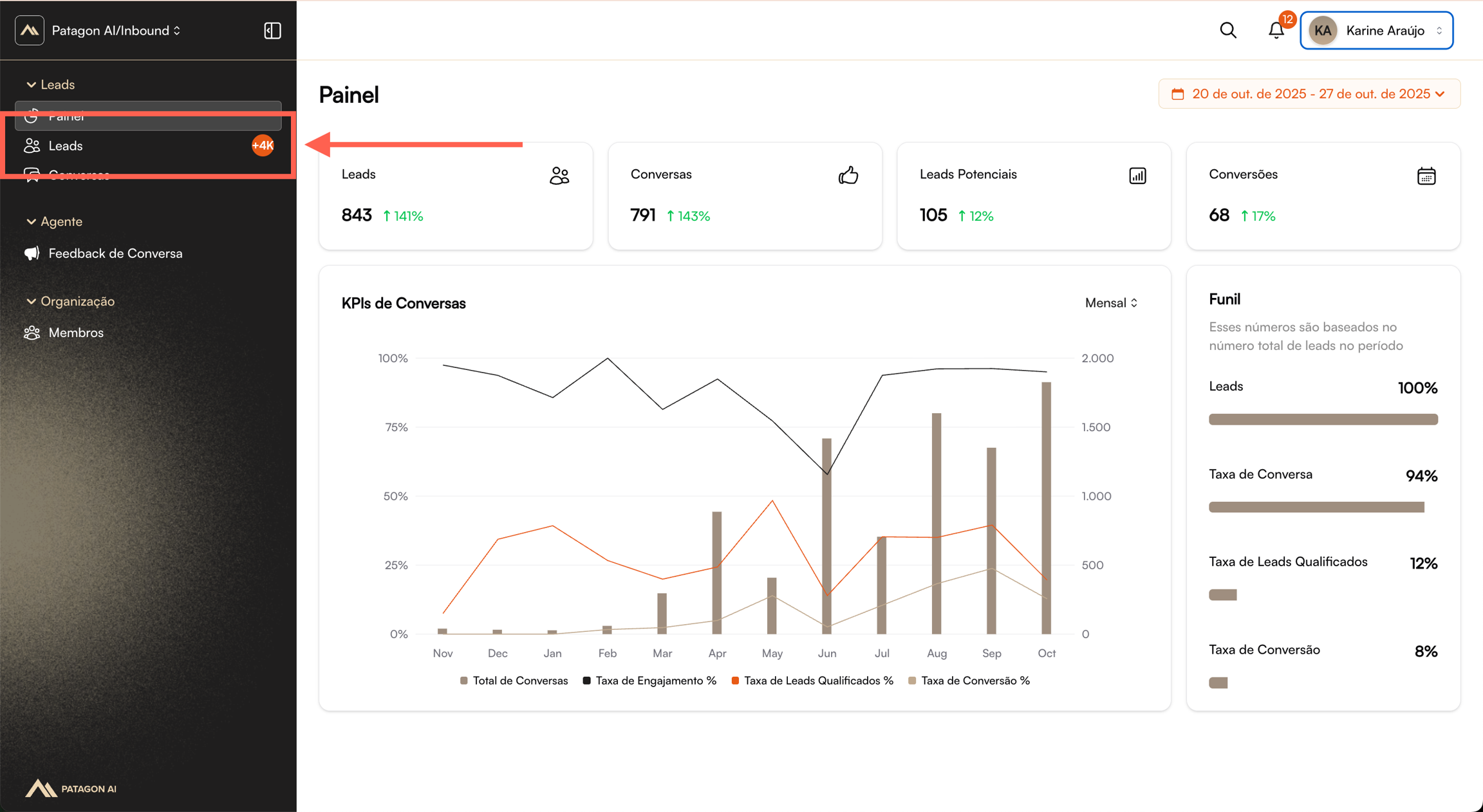
This integrated view replaces spreadsheets, scattered messages, and lost opportunities. When you open this section, you will see a complete table with all leads who interacted through WhatsApp.
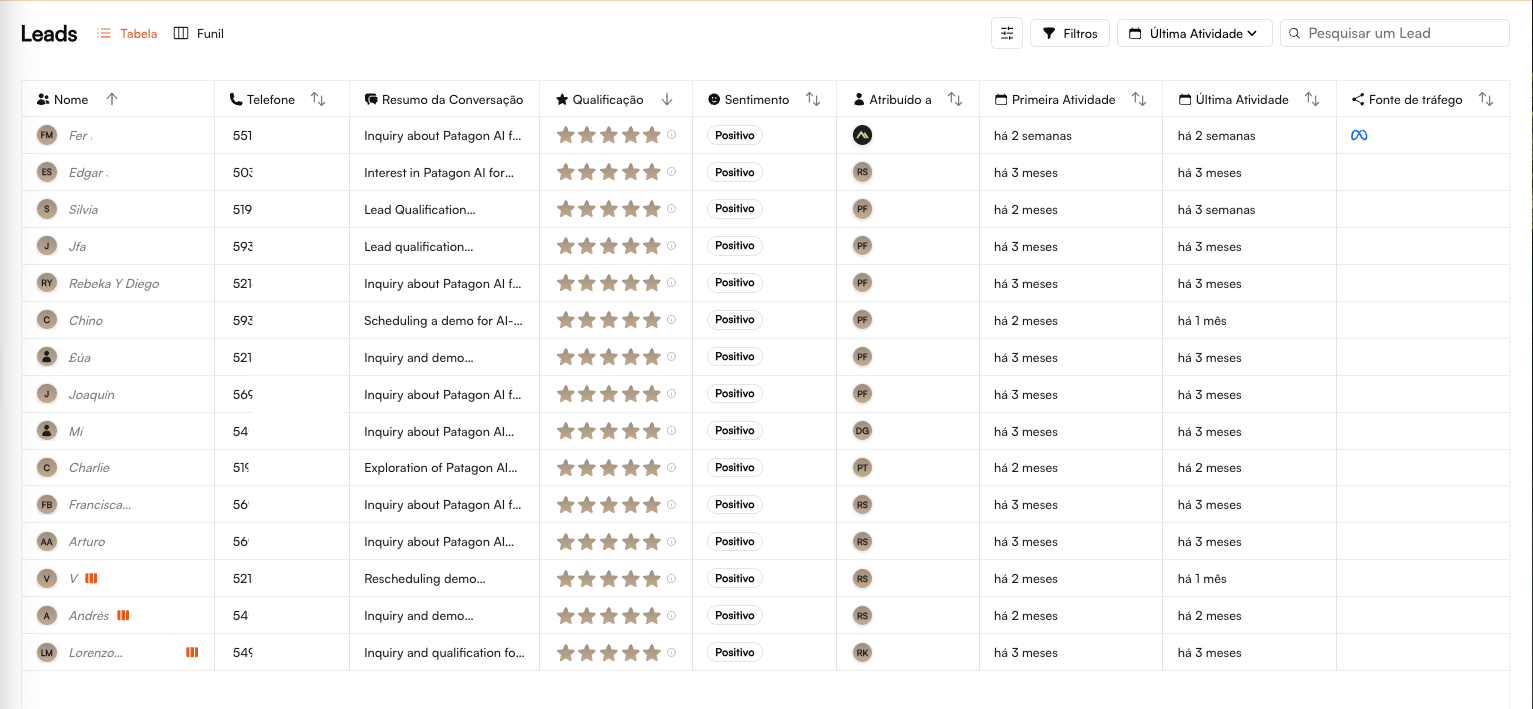
The table displays information organized into columns to make lead management and prioritization easier.
Top Tools
⚙️ Filters – Quick access to advanced filters
🔽 Last Activity – Sort leads by most recent activity
🔍 Search Lead – Search field to find specific contacts
How to Interpret the Lead Table
👤 Name
WhatsApp name
Quick identification
📞 Phone
Full phone number
Contact info and uniqueness
💬 Summary
Conversation summary
Instant context and main conversation insight
⭐ Qualification
1 to 5 stars
Defines lead priority
🎭 Sentiment
Positive / Neutral / Negative
Adjusts sales approach
👤 Assigned To
Lead owner
Indicates who is responsible for the lead
📅 First Activity
Start of the journey
Time in the funnel
📅 Last Activity
Most recent interaction
Urgency indicator
🔗 Source
Lead origin
Performance metrics (Website, Meta, etc.)
The table works as a command console for your sales team. Each column is designed to quickly answer essential questions:
Who is the hottest lead?
Who engaged recently?
Who is unassigned or unattended?
Which channel is bringing better opportunities?
No unnecessary clicks. The right decision appears in front of you.
⭐ Qualification + Sentiment = Priority
This is where Patagon AI stands out: automatic and transparent qualification. The AI analyzes dozens of signals—intent, urgency, budget, fast replies, keywords, behavior—and converts them into a 1 to 5-star score.
Data-driven decision-making. Always.
Your salesperson no longer wastes time trying to “interpret” conversations.
⭐⭐⭐⭐⭐
Positive
P0 — Critical
Respond within 5 minutes
⭐⭐⭐⭐⭐
Positive
P1 — High
Handle objections quickly
⭐⭐⭐⭐☆
Neutral
P2 — Medium
Move the lead forward in the funnel
⭐⭐⭐☆☆
Neutral
P3 — Medium
Educate and nurture
⭐⭐☆☆☆
Negative
P4 — Low
Provide supporting content
⭐☆☆☆☆
Negative
P5 — Very Low
Automated nurturing
📌 Hover over the “!” next to the stars to see the full reasoning behind the score.
Sentiment Analysis Also Matters
😊 Positive → accelerate the closing
😐 Neutral → provide objective information
😟 Negative → handle objections carefully
🔁 Atividade
The First Activity and Last Activity columns act as an urgency thermometer:
Last activity a few minutes ago
Highly active lead
Respond immediately
Last activity > 3 days
Cooling down
Urgent follow-up
First activity months ago with no further interaction
Lost lead
Consider archiving
This analysis helps you prioritize effectively and keep hot leads moving—exactly what drives higher conversion rates.
➜ Next Step
To dive deeper into the context of each opportunity, click on a specific lead and access the Lead Details section — where you'll find complete information to move forward in the funnel: conversion.
Last updated